
Preschool · Ages 2 to 5
Preschool learning app: short activities for ages 2 to 5
Ziippi is a preschool app with short, spoken activities: numbers, letters, colors and shapes, tracing and feelings. Each child has their own profile, in English or Spanish, and you see their progress in a parent area protected with a PIN.
Getting started
Check any preschool app in five minutes
Play one activity yourself. Can you follow the voice without reading? What happens after a wrong answer? Are there ads or purchase buttons in the child’s area? Is it clear where to stop? Then read the privacy information. In Ziippi there are no ads, and nothing in the child’s area costs real money.
What preschool covers
Preschool skills fall into a few groups: early math (counting, comparing, shapes), early literacy (sounds, rhymes, letters, listening), the hands (drawing and tracing) and feelings (naming emotions, waiting, asking for help). Ziippi has an area for each: Numbers, Letters, Discover, My hands and Feelings, plus Speak, for first words.
Short sessions, spoken instructions
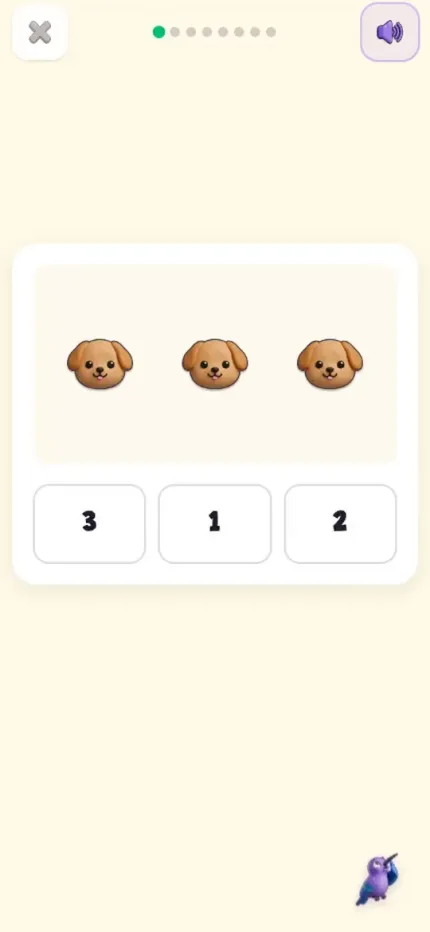
Sessions are short and each one has a small set of guided activities. Every instruction is read aloud, so children who don’t read yet can play on their own, and they answer by tapping or dragging. In Numbers the voice asks “How many puppies do you see?” and your child taps 3. In Letters they hear “sss… sun” and tap the s. In Discover they are asked “Which one is red?”; in My hands they trace a circle; in Feelings they tap the sad face.
English or Spanish, one per child
You choose the language for each child’s profile. In English, your child practices numbers, letters, colors and shapes, tracing and feelings, and in Speak learns first words in Spanish. In a profile set to Spanish, the spoken instructions are in Spanish and are not translated.
One profile per child, no ads
Each child has their own profile with their name, age and language, so siblings can share a device without mixing their progress. No ads, and nothing in the child’s area costs real money: the in-game shop only takes seeds earned by playing. Account settings and the subscription live in the parent area, behind an adult PIN, where you can also see progress by topic and a calendar of sessions.
How billing works
Ziippi is a subscription bought through the App Store or Google Play. Eligible accounts get a trial when they confirm in the store. After that, the plan you choose is charged and renews automatically unless you cancel it in the store before the renewal date. The store shows the exact price and date before you accept.
Frequently asked questions
What ages is it for?
Ages 2 to 5, the preschool years. There is no content beyond preschool yet.
How long is a session?
Sessions are short and each one contains a small set of guided activities.
Does it need internet?
Yes, to load each session and save progress.
Can I see what my child practiced?
Yes. The parent area, behind an adult PIN, shows progress by topic and a calendar of sessions.
How do I cancel?
From your subscriptions in the App Store or Google Play, depending on where you subscribed. Cancel before the renewal date to avoid the next charge.
Try an activity with Ziippi
Explore an activity and see how you can help your child.
Try an activityPrefer the app? Find it in your store.